怎么搭建个人知识库
用 Obsidian 和 Codex 搭建个人知识库:安装工具、制定规则、剪藏资料,让 AI 整理知识并定期体检。
收藏了不少文章,真正需要用的时候,却想不起放在哪里;新知识学进来了,旧笔记也很少回头更新。
这篇文章介绍一种做法:用 Obsidian 保存资料,用 Codex 按规则整理、关联和更新知识。你负责挑选资料、提出问题和审核重要结论,AI 负责处理那些重复的整理工作。
我们会按这个顺序来:安装工具 → 制定知识库规则 → 剪藏和摄入资料 → 定期体检。
一、安装软件
1. 安装 Codex
Codex 是这里的 AI Agent,负责读取资料、创建笔记和维护知识库。我之前写过详细的安装教程,这里就不重复了:
安装登录后,确认 Codex 能打开和读写本地文件夹。后面我们会让它打开 Obsidian 的知识库文件夹。
2. 安装 Obsidian,创建知识库
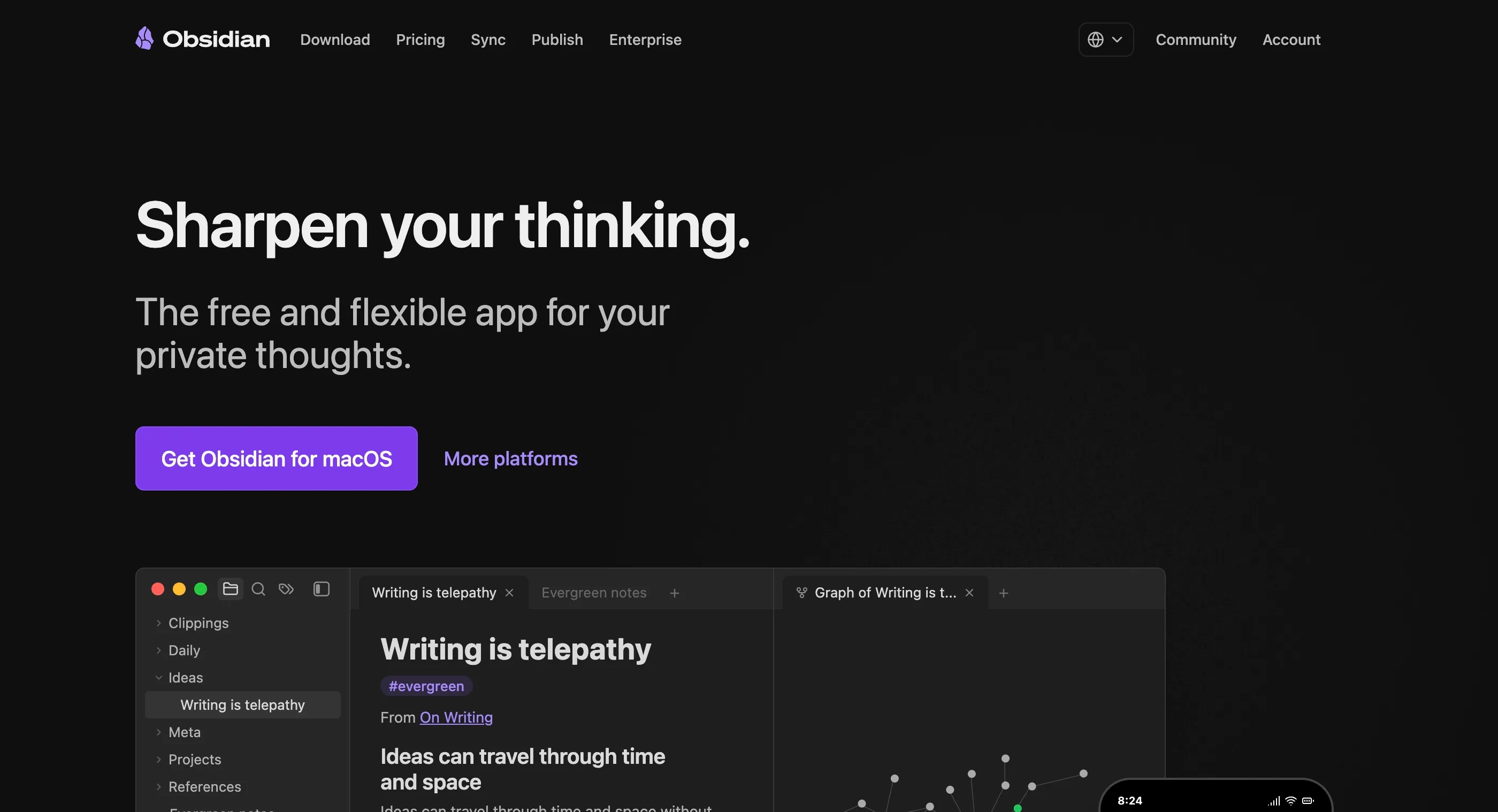
打开 Obsidian 官网,下载并安装适合自己电脑的版本。下图以 macOS 下载页面为例,其他系统可以通过「More platforms」选择。
安装完成后,打开 Obsidian:
- 选择创建新库。
- 给库起个名字,例如「我的知识库」,再选择电脑上的保存位置,点击创建。
- 记住这个文件夹的位置,在 Codex 中打开同一个文件夹。
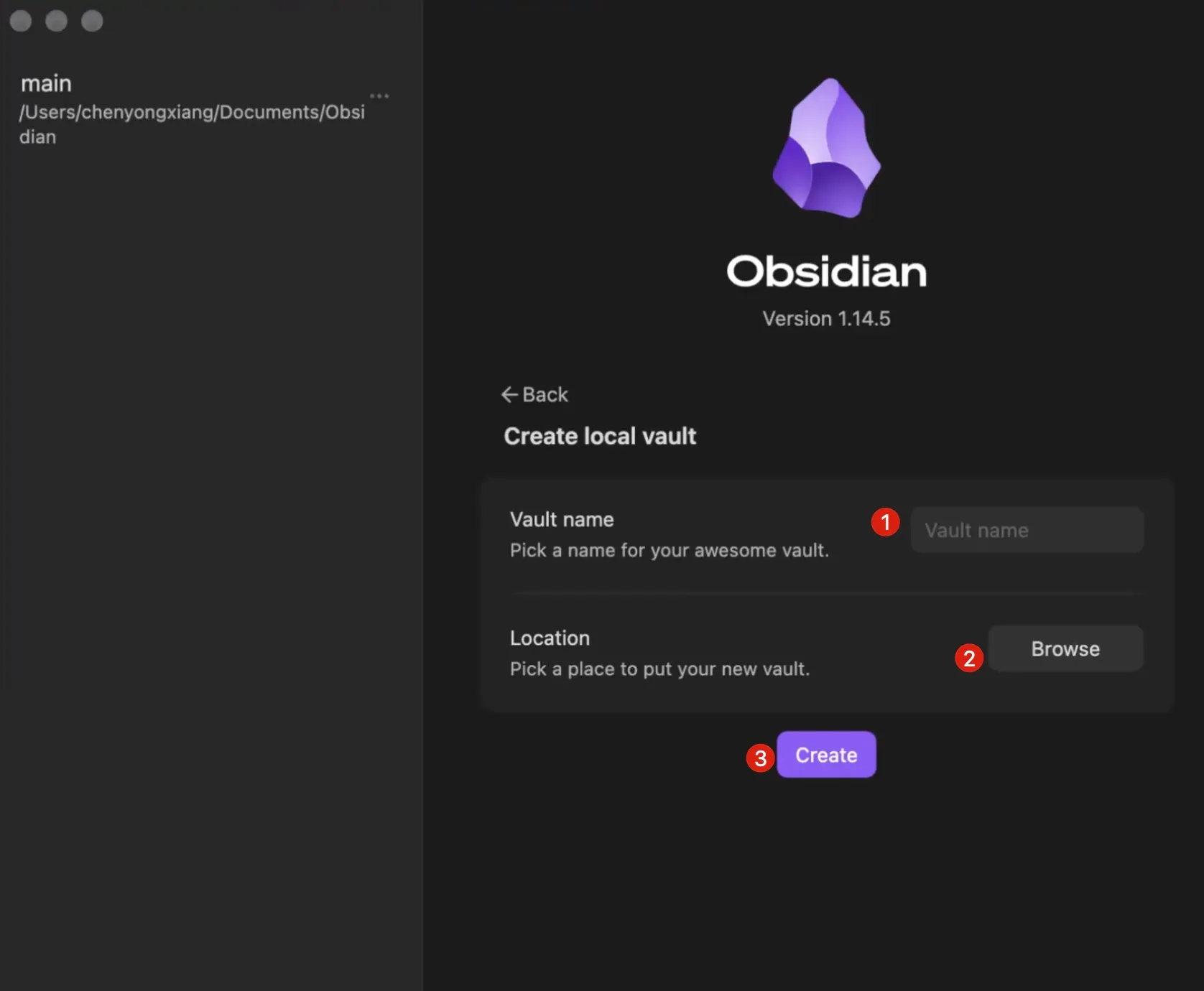
Obsidian 的库本质上就是电脑里的一个文件夹。Codex 在里面创建或修改笔记后,Obsidian 可以展示这些变化。
建议第一次先用一个新建的演示库,熟悉流程后再迁移到自己的常用库。笔记保存在本地,不代表云端 AI 处理内容时数据不会离开电脑;涉及隐私的资料,请先确认所用服务的数据处理方式。
3. 启用 Obsidian CLI
Obsidian CLI 是 Obsidian 的命令行工具,可以让 AI Agent 通过命令搜索、读取和操作知识库。它不是社区插件。
- 将 Obsidian 更新到支持 CLI 的安装程序版本。官方目前要求 1.12.7 或更高版本的安装程序;如果应用内更新后仍找不到选项,可以从官网下载最新安装程序重新安装。
- 在 Obsidian 中打开 设置 → 通用,启用 Command line interface(命令行界面),并按照提示完成注册。
- 保持 Obsidian 运行,打开电脑的终端,输入:
obsidian help如果看到命令帮助,说明 CLI 已经可以使用。遇到问题可以参考 Obsidian CLI 官方文档。
4. 安装 Obsidian Skill
Skill 可以理解为交给 AI Agent 的一份专业操作指南。Obsidian 的这套 Skill 包含笔记格式、CLI 等相关技能,可以帮助 Agent 更好地操作知识库。
我们不需要手动研究安装命令,直接把 Obsidian Skills 仓库交给 Codex,让它按照仓库的安装说明处理。复制下面的提示词即可:
请阅读这个仓库的 README 和安装说明:
https://github.com/kepano/obsidian-skills

我正在使用 Codex 和 Obsidian。请先检查我的环境,以及是否已经安装过这些 Skill;然后按照仓库针对 Codex 的说明,为我安装 Obsidian Skills。不要覆盖已有的同名 Skill;如果发现冲突,先告诉我并等待确认。

安装前请说明准备修改哪些文件,获得我的确认后再执行。安装完成后检查安装位置和每个 Skill 的 SKILL.md 是否存在,并告诉我是否需要重新启动 Codex,以及如何验证它们可用。
确认 Codex 给出的安装计划后再让它执行。安装结束后,根据它的提示重新打开会话,并让它检查是否能识别 Obsidian 相关 Skill。
二、让 AI 帮你制定知识库规则
软件装好了,接下来先别急着往里塞文章。我们需要先给 AI 一份工作规则:原始资料放哪里、整理后的知识怎么保存、新旧资料冲突时怎么办。
这里参考 Andrej Karpathy 的 LLM Wiki。这不是一套必须照搬的目录模板,而是一种让 AI 持续整理和维护知识的思路。
查看 LLM Wiki 英文原文
LLM Wiki
A pattern for building personal knowledge bases using LLMs.
This is an idea file, it is designed to be copy pasted to your own LLM Agent (e.g. OpenAI Codex, Claude Code, OpenCode / Pi, or etc.). Its goal is to communicate the high level idea, but your agent will build out the specifics in collaboration with you.
The core idea
Most people’s experience with LLMs and documents looks like RAG: you upload a collection of files, the LLM retrieves relevant chunks at query time, and generates an answer. This works, but the LLM is rediscovering knowledge from scratch on every question. There’s no accumulation. Ask a subtle question that requires synthesizing five documents, and the LLM has to find and piece together the relevant fragments every time. Nothing is built up. NotebookLM, ChatGPT file uploads, and most RAG systems work this way.
The idea here is different. Instead of just retrieving from raw documents at query time, the LLM incrementally builds and maintains a persistent wiki — a structured, interlinked collection of markdown files that sits between you and the raw sources. When you add a new source, the LLM doesn’t just index it for later retrieval. It reads it, extracts the key information, and integrates it into the existing wiki — updating entity pages, revising topic summaries, noting where new data contradicts old claims, strengthening or challenging the evolving synthesis. The knowledge is compiled once and then kept current, not re-derived on every query.
This is the key difference: the wiki is a persistent, compounding artifact. The cross-references are already there. The contradictions have already been flagged. The synthesis already reflects everything you’ve read. The wiki keeps getting richer with every source you add and every question you ask.
You never (or rarely) write the wiki yourself — the LLM writes and maintains all of it. You’re in charge of sourcing, exploration, and asking the right questions. The LLM does all the grunt work — the summarizing, cross-referencing, filing, and bookkeeping that makes a knowledge base actually useful over time. In practice, I have the LLM agent open on one side and Obsidian open on the other. The LLM makes edits based on our conversation, and I browse the results in real time — following links, checking the graph view, reading the updated pages. Obsidian is the IDE; the LLM is the programmer; the wiki is the codebase.
This can apply to a lot of different contexts. A few examples:
- Personal: tracking your own goals, health, psychology, self-improvement — filing journal entries, articles, podcast notes, and building up a structured picture of yourself over time.
- Research: going deep on a topic over weeks or months — reading papers, articles, reports, and incrementally building a comprehensive wiki with an evolving thesis.
- Reading a book: filing each chapter as you go, building out pages for characters, themes, plot threads, and how they connect. By the end you have a rich companion wiki. Think of fan wikis like Tolkien Gateway — thousands of interlinked pages covering characters, places, events, languages, built by a community of volunteers over years. You could build something like that personally as you read, with the LLM doing all the cross-referencing and maintenance.
- Business/team: an internal wiki maintained by LLMs, fed by Slack threads, meeting transcripts, project documents, customer calls. Possibly with humans in the loop reviewing updates. The wiki stays current because the LLM does the maintenance that no one on the team wants to do.
- Competitive analysis, due diligence, trip planning, course notes, hobby deep-dives — anything where you’re accumulating knowledge over time and want it organized rather than scattered.
Architecture
There are three layers:
Raw sources — your curated collection of source documents. Articles, papers, images, data files. These are immutable — the LLM reads from them but never modifies them. This is your source of truth.
The wiki — a directory of LLM-generated markdown files. Summaries, entity pages, concept pages, comparisons, an overview, a synthesis. The LLM owns this layer entirely. It creates pages, updates them when new sources arrive, maintains cross-references, and keeps everything consistent. You read it; the LLM writes it.
The schema — a document (e.g. CLAUDE.md for Claude Code or AGENTS.md for Codex) that tells the LLM how the wiki is structured, what the conventions are, and what workflows to follow when ingesting sources, answering questions, or maintaining the wiki. This is the key configuration file — it’s what makes the LLM a disciplined wiki maintainer rather than a generic chatbot. You and the LLM co-evolve this over time as you figure out what works for your domain.
Operations
Ingest. You drop a new source into the raw collection and tell the LLM to process it. An example flow: the LLM reads the source, discusses key takeaways with you, writes a summary page in the wiki, updates the index, updates relevant entity and concept pages across the wiki, and appends an entry to the log. A single source might touch 10-15 wiki pages. Personally I prefer to ingest sources one at a time and stay involved — I read the summaries, check the updates, and guide the LLM on what to emphasize. But you could also batch-ingest many sources at once with less supervision. It’s up to you to develop the workflow that fits your style and document it in the schema for future sessions.
Query. You ask questions against the wiki. The LLM searches for relevant pages, reads them, and synthesizes an answer with citations. Answers can take different forms depending on the question — a markdown page, a comparison table, a slide deck (Marp), a chart (matplotlib), a canvas. The important insight: good answers can be filed back into the wiki as new pages. A comparison you asked for, an analysis, a connection you discovered — these are valuable and shouldn’t disappear into chat history. This way your explorations compound in the knowledge base just like ingested sources do.
Lint. Periodically, ask the LLM to health-check the wiki. Look for: contradictions between pages, stale claims that newer sources have superseded, orphan pages with no inbound links, important concepts mentioned but lacking their own page, missing cross-references, data gaps that could be filled with a web search. The LLM is good at suggesting new questions to investigate and new sources to look for. This keeps the wiki healthy as it grows.
Indexing and logging
Two special files help the LLM (and you) navigate the wiki as it grows. They serve different purposes:
index.md is content-oriented. It’s a catalog of everything in the wiki — each page listed with a link, a one-line summary, and optionally metadata like date or source count. Organized by category (entities, concepts, sources, etc.). The LLM updates it on every ingest. When answering a query, the LLM reads the index first to find relevant pages, then drills into them. This works surprisingly well at moderate scale (~100 sources, ~hundreds of pages) and avoids the need for embedding-based RAG infrastructure.
log.md is chronological. It’s an append-only record of what happened and when — ingests, queries, lint passes. A useful tip: if each entry starts with a consistent prefix (e.g. ## [2026-04-02] ingest | Article Title), the log becomes parseable with simple unix tools — grep "^## \[" log.md | tail -5 gives you the last 5 entries. The log gives you a timeline of the wiki’s evolution and helps the LLM understand what’s been done recently.
Optional: CLI tools
At some point you may want to build small tools that help the LLM operate on the wiki more efficiently. A search engine over the wiki pages is the most obvious one — at small scale the index file is enough, but as the wiki grows you want proper search. qmd is a good option: it’s a local search engine for markdown files with hybrid BM25/vector search and LLM re-ranking, all on-device. It has both a CLI (so the LLM can shell out to it) and an MCP server (so the LLM can use it as a native tool). You could also build something simpler yourself — the LLM can help you vibe-code a naive search script as the need arises.
Tips and tricks
- Obsidian Web Clipper is a browser extension that converts web articles to markdown. Very useful for quickly getting sources into your raw collection.
- Download images locally. In Obsidian Settings → Files and links, set “Attachment folder path” to a fixed directory (e.g.
raw/assets/). Then in Settings → Hotkeys, search for “Download” to find “Download attachments for current file” and bind it to a hotkey (e.g. Ctrl+Shift+D). After clipping an article, hit the hotkey and all images get downloaded to local disk. This is optional but useful — it lets the LLM view and reference images directly instead of relying on URLs that may break. Note that LLMs can’t natively read markdown with inline images in one pass — the workaround is to have the LLM read the text first, then view some or all of the referenced images separately to gain additional context. It’s a bit clunky but works well enough. - Obsidian’s graph view is the best way to see the shape of your wiki — what’s connected to what, which pages are hubs, which are orphans.
- Marp is a markdown-based slide deck format. Obsidian has a plugin for it. Useful for generating presentations directly from wiki content.
- Dataview is an Obsidian plugin that runs queries over page frontmatter. If your LLM adds YAML frontmatter to wiki pages (tags, dates, source counts), Dataview can generate dynamic tables and lists.
- The wiki is just a git repo of markdown files. You get version history, branching, and collaboration for free.
Why this works
The tedious part of maintaining a knowledge base is not the reading or the thinking — it’s the bookkeeping. Updating cross-references, keeping summaries current, noting when new data contradicts old claims, maintaining consistency across dozens of pages. Humans abandon wikis because the maintenance burden grows faster than the value. LLMs don’t get bored, don’t forget to update a cross-reference, and can touch 15 files in one pass. The wiki stays maintained because the cost of maintenance is near zero.
The human’s job is to curate sources, direct the analysis, ask good questions, and think about what it all means. The LLM’s job is everything else.
The idea is related in spirit to Vannevar Bush’s Memex (1945) — a personal, curated knowledge store with associative trails between documents. Bush’s vision was closer to this than to what the web became: private, actively curated, with the connections between documents as valuable as the documents themselves. The part he couldn’t solve was who does the maintenance. The LLM handles that.
Note
This document is intentionally abstract. It describes the idea, not a specific implementation. The exact directory structure, the schema conventions, the page formats, the tooling — all of that will depend on your domain, your preferences, and your LLM of choice. Everything mentioned above is optional and modular — pick what’s useful, ignore what isn’t. For example: your sources might be text-only, so you don’t need image handling at all. Your wiki might be small enough that the index file is all you need, no search engine required. You might not care about slide decks and just want markdown pages. You might want a completely different set of output formats. The right way to use this is to share it with your LLM agent and work together to instantiate a version that fits your needs. The document’s only job is to communicate the pattern. Your LLM can figure out the rest.
查看 LLM Wiki 中文翻译及补充要求
LLM Wiki
一种使用大语言模型构建个人知识库的模式。
这是一份思路文档,可以直接复制给你的 AI Agent,例如 OpenAI Codex、Claude Code、OpenCode、Pi 等。它的目的是传达整体思路;具体实现则由你的 Agent 与你一起制定。
核心思路
大多数人使用大语言模型处理文档的方式类似于 RAG:上传一批文件,提问时模型检索相关片段,再生成回答。这种方法可行,但每次提问,模型都要重新从资料中寻找知识,无法形成积累。如果提出一个需要综合五份文档才能回答的复杂问题,模型每次都得重新寻找并拼接相关片段,不会留下已经整理好的成果。NotebookLM、ChatGPT 文件上传和大多数 RAG 系统都采用类似方式。
这里的思路有所不同:不是仅在提问时从原始文档中检索,而是让大语言模型逐步构建并维护一套持久的 Wiki。它由结构化、互相链接的 Markdown 文件组成,位于你和原始资料之间。当你加入新资料时,模型不只是建立索引供日后检索;它会阅读资料、提取关键信息,并将其融入已有 Wiki:更新实体页面、修订主题摘要、记录新旧信息之间的矛盾,让不断发展的综合认识得到加强或受到挑战。知识经过整理后持续更新,而不是每次提问都重新推导。
关键区别在于:**Wiki 是一份持续存在、不断积累的成果。**交叉引用已经建立,矛盾已经被标记,综合内容也已经反映你读过的资料。每加入一份资料、提出一个问题,Wiki 都有机会变得更加丰富。
你很少需要亲自编写 Wiki,甚至可以完全不写——由大语言模型负责撰写和维护。你负责挑选资料、探索和提出合适的问题;模型负责总结、交叉引用、归档和记录等繁琐工作,让知识库长期保持可用。在实际使用中,我会一边打开 LLM Agent,一边打开 Obsidian:模型根据我们的对话修改文件,我实时浏览结果,跟随链接、查看关系图谱、阅读更新后的页面。Obsidian 是 IDE,模型是程序员,Wiki 则是代码库。
这种方法可以用于很多场景,例如:
- 个人生活:追踪自己的目标、健康、心理状态和自我提升;归档日记、文章及播客笔记,逐步形成关于自己的结构化认识。
- 研究:围绕一个主题持续数周或数月深入研究,阅读论文、文章和报告,逐步构建全面的 Wiki,并不断完善自己的论点。
- 阅读一本书:边读边归档各章节,逐步建立人物、主题、情节及其联系的页面。读完后,你会拥有一份丰富的阅读指南。可以想想 Tolkien Gateway 这样的粉丝 Wiki:志愿者社区历时多年建立了数千个互相关联的人物、地点、事件和语言页面。你也可以自己建立类似的知识库,由大语言模型处理交叉引用和维护。
- 企业或团队:建立由大语言模型维护的内部 Wiki,摄入 Slack 讨论、会议转录、项目文档和客户通话等资料。必要时由人参与审核更新,模型则负责大家不愿反复处理的维护工作,让 Wiki 保持更新。
- 竞争分析、尽职调查、旅行规划、课程笔记、深入研究爱好:任何需要长期积累知识、又希望内容井井有条而不是四处散落的场景,都可以使用。
架构
知识库分为三层:
原始资料(Raw sources):由你挑选收集的源文档,包括文章、论文、图片和数据文件。这一层是不可变的:大语言模型可以读取,但不修改。它是核对信息的原始依据。
Wiki:由大语言模型生成的 Markdown 文件目录,包括摘要、实体页面、概念页面、对比、概览及综合分析。模型负责这一层:创建页面,在新资料到来时更新内容,维护交叉引用,并尽量保持整体一致。你负责阅读,模型负责编写。
规则(Schema):一份告诉模型 Wiki 如何组织、遵循什么约定,以及摄入资料、回答问题和维护时如何操作的文档。例如 Claude Code 可以使用 CLAUDE.md,Codex 可以使用 AGENTS.md。这是关键的配置文件:它让模型从一个通用聊天机器人,变成有章法的 Wiki 维护者。随着你逐渐了解哪些做法适合自己的领域,可以和模型一起不断完善规则。
操作
**摄入(Ingest)。**把一份新资料放进原始资料区,然后告诉模型处理。一个示例流程是:模型阅读资料,和你讨论关键收获,在 Wiki 中写一篇摘要,更新目录,更新相关的实体与概念页面,并在日志中追加一条记录。一份资料可能涉及 10–15 个 Wiki 页面。作者个人更喜欢一次摄入一份资料并保持参与:阅读摘要、检查更新、引导模型关注重点。你也可以减少监督,一次批量摄入多份资料。关键是找到适合自己的流程,并记录在规则中供后续会话使用。
**提问(Query)。**基于 Wiki 提出问题。模型查找并阅读相关页面,综合回答并附上引用。回答可以根据问题采取不同形式:Markdown 页面、对比表、幻灯片(Marp)、图表(matplotlib)或画布。重要的是:**有价值的回答可以作为新页面放回 Wiki。**你要求的对比、得到的分析、发现的联系,都不应该消失在聊天记录中。这样,你探索问题的成果也能像摄入资料一样在知识库中不断积累。
**体检(Lint)。**定期让模型检查 Wiki 的健康状况,包括:页面之间是否有矛盾、旧说法是否已被新资料取代、是否有没有入链的孤立页面、重要概念是否被提及却没有自己的页面、是否缺少交叉引用,以及哪些信息缺口可以通过网络搜索补充。模型也可以建议值得进一步研究的新问题和新资料。这样,Wiki 在不断增长时仍能保持健康。
目录与日志
两个特殊文件可以帮助你和模型在不断增长的 Wiki 中找到方向,它们的用途不同:
**index.md 面向内容。**它是整个 Wiki 的目录:每个页面都列出链接和一句话摘要,也可以附上日期、来源数量等元数据,再按实体、概念、来源等类别组织。模型每次摄入资料时都会更新它;回答问题时先读取目录,找到相关页面后再深入阅读。在中等规模下——约 100 份资料、数百个页面——这种方法效果相当不错,可以避免搭建基于向量嵌入的 RAG 基础设施。
**log.md 按时间组织。**它是一份只追加、不覆盖的记录,记下什么时候发生了什么,例如摄入、提问和体检。一个实用技巧是为每条记录使用统一的标题前缀,例如 ## [2026-04-02] ingest | 文章标题,这样就可以用简单的 Unix 工具解析:grep "^## \\[" log.md | tail -5 可以查看最近五条记录。日志展示 Wiki 的演变时间线,也帮助模型了解最近做过什么。
可选:命令行工具
随着知识库增长,你可能想建立一些小工具,让模型更高效地操作 Wiki。最直接的是搜索工具:规模小时目录文件已经够用,规模变大后则需要更完善的搜索。qmd 是一个选项:它是运行在本地的 Markdown 搜索工具,支持 BM25 与向量混合搜索以及大语言模型重排序。它既有 CLI,可以让模型通过命令调用;也有 MCP 服务器,可以作为模型的原生工具使用。你也可以从更简单的方案开始——需要时让模型帮你用自然语言驱动编程,写一个基础搜索脚本。
提示与技巧
- Obsidian Web Clipper 是浏览器扩展,可以把网页文章转换成 Markdown,很适合快速将资料放入原始资料区。
- **将图片下载到本地。**在 Obsidian 的「设置 → 文件与链接」中,将附件文件夹路径设为固定目录,例如
raw/assets/。然后在「设置 → 快捷键」中搜索 Download,找到「下载当前文件的附件」,为它设置快捷键,例如 Ctrl+Shift+D。剪藏文章后按下快捷键,就可以把图片下载到本地。这一步是可选的,但有助于模型直接查看和引用图片,而不必依赖可能失效的 URL。大语言模型不能在一次读取中自动看懂 Markdown 中嵌入的所有图片;可以先让模型读取文字,再分别查看部分或全部引用图片,以补充上下文。操作稍显笨拙,但效果不错。 - Obsidian 图谱视图可以展示 Wiki 的结构:哪些页面互相连接、哪些是中心节点、哪些是孤立页面。
- Marp 是一种基于 Markdown 的幻灯片格式,Obsidian 有对应插件,适合用知识库内容生成演示文稿。
- Dataview 是 Obsidian 插件,可以查询页面的 frontmatter。如果模型为 Wiki 页面添加 YAML frontmatter,例如标签、日期和来源数量,Dataview 可以据此生成动态表格和列表。
- Wiki 是由 Markdown 文件组成的 Git 仓库,可以利用 Git 的版本历史、分支和协作功能。
为什么这种方法有效
维护知识库最繁琐的部分不是阅读或思考,而是各种整理工作:更新交叉引用、让摘要保持最新、记录新资料与旧说法的矛盾,以及维持几十个页面之间的一致性。人们放弃维护 Wiki,往往是因为维护负担增长得比收益更快。大语言模型不会感到厌烦,可以一次处理多个文件,因此能够承担这些重复的维护工作。
人的工作是挑选资料、引导分析、提出好问题,并思考这些内容意味着什么;大语言模型则负责其余整理工作。
这个思路在精神上与 Vannevar Bush 的 Memex(1945)相关:一个由个人挑选、通过关联路径连接内容的知识存储系统。Bush 的设想比后来发展成的互联网更接近这种模式:私人持有、主动整理,文档之间的联系与文档本身同样有价值。他当时没能解决的是由谁来维护;这里由大语言模型承担维护工作。
说明
这份文档刻意保持抽象:它描述的是思路,而非某一种具体实现。目录结构、规则约定、页面格式和工具选择,都取决于你的领域、偏好和所用的大语言模型。上面提到的所有内容都是可选、可组合的:选择对自己有用的,忽略其余部分。例如,资料可能全部是文本,不需要处理图片;Wiki 的规模可能小到只用目录文件就够了,不需要搜索引擎;你可能不关心幻灯片,只想要 Markdown 页面;也可能希望采用完全不同的输出格式。
正确的使用方式是把这份文档交给你的 LLM Agent,一起将这套模式落实成适合你的知识库。文档的作用只是传达模式,剩下的细节可以交给模型协助完成。
补充要求:英文资料用中文融入知识库
**以下是我为这篇教程额外加入的要求,不属于 Karpathy 原文。**如果摄入的原始资料是英文,保留英文原件,不改写或删除;AI 在提取关键信息、生成摘要、更新概念页面并将知识融入 Wiki 时,使用中文撰写。专业名词、产品名等可以保留英文原文,同时保留来源链接或原始文件路径,方便回查。
复制提示词,创建你的规则
在 Codex 中打开刚才新建的知识库文件夹,把下面的提示词复制给 Codex。你也可以把「主要用途」改成自己的实际需求。如果 Agent 无法访问博客,就展开上面的中文翻译,将完整内容复制给它。
当前文件夹是我新建的 Obsidian 知识库。请先阅读这篇博客中的「LLM Wiki 中文翻译及补充要求」折叠块:
https://www.airyanchen.cc/writing/build-personal-knowledge-base

请以其中的中文翻译和补充要求为依据,和我一起设计并搭建适合我的个人知识库。如果无法访问博客或读取折叠块中的内容,请告诉我,我会将完整中文内容复制给你;在读到它之前不要假装已经阅读。

我的主要用途是收集文章、学习新知识,并在需要时查找和使用这些积累。

请考虑以下要求:
1. 原始资料与整理后的知识分开存放;保留原始资料,不自动改写、移动或删除。
2. 摄入新资料时,提取重点,先检查已有相关页面,再增量更新、建立必要的关联;记录来源链接或本地路径、日期和适用条件。缺失的信息标明未知,不要编造。
3. 如果原始资料是英文,保留英文原件;提炼并写入知识库的摘要、概念和其他知识内容使用中文,专业名词可以保留英文。
4. 建立目录和追加式日志,记录新增及更新的页面,避免对未变化的资料重复摄入。
5. 回答问题时标明来源,区分原文事实、作者观点和你的推断;资料不足时明确说明。
6. 体检时检查可能过期或互相冲突的内容、缺失来源和断链。事实冲突、删除、合并或批量重构先报告,等我确认后再处理。
7. 将 Codex 的工作规则写入知识库根目录的 AGENTS.md;只在当前知识库内操作,不读取其他私人文件。

请先向我说明建议的目录、规则和将要创建的文件,等我确认后再执行。完成后列出实际创建的文件。
先看 Codex 给出的计划,确认符合自己的需求,再让它创建。完成后回到 Obsidian,检查目录和 AGENTS.md 是否出现。下面是一个初始化后的示例:
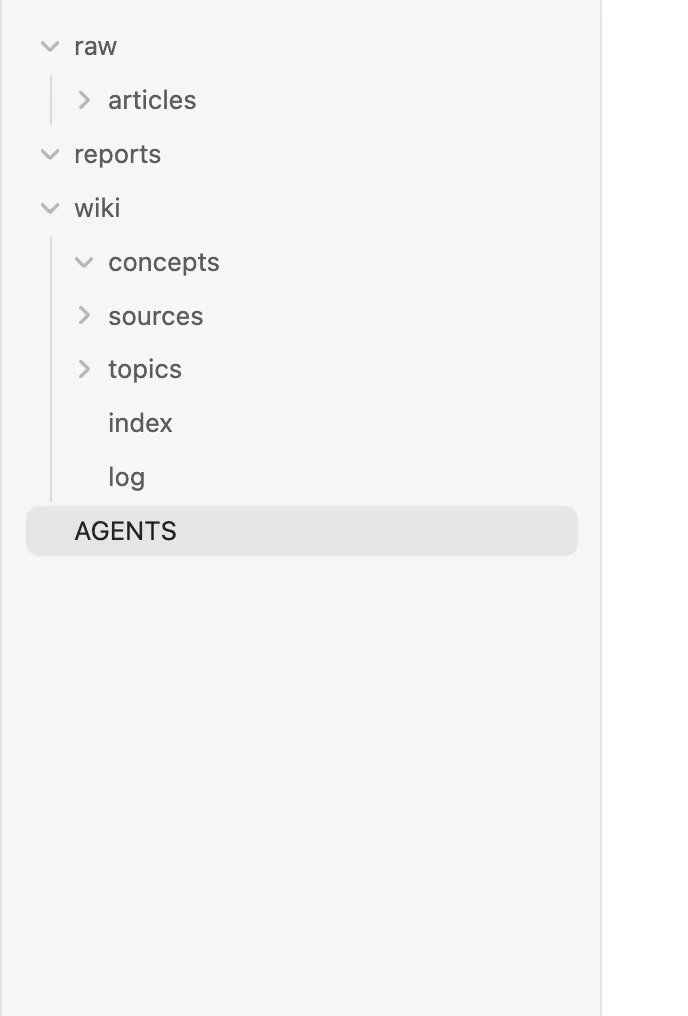
一个简单的结构可以是这样,具体名称可以和 AI 商量:
我的知识库/
├── AGENTS.md          # AI 的工作规则
├── raw/               # 原始资料
│   └── articles/      # 剪藏的文章
├── wiki/              # 整理后的知识
│   ├── index.md       # 知识目录
│   └── log.md         # 更新日志
└── reports/           # 摄入与体检报告
三、剪藏文章,让 AI 摄入知识
知识库建好了,接下来找一篇真正想学习的文章,把它放进去。这里使用 Obsidian Web Clipper:它是浏览器扩展,不是 Obsidian 里的社区插件。
1. 安装 Web Clipper
- 打开 Obsidian Web Clipper 官方页面。
- 选择自己使用的浏览器,进入对应的扩展商店,按提示安装。
- 打开一篇文章,点击浏览器工具栏里的 Web Clipper 图标。
- 在预览中选择刚才创建的知识库,将笔记位置设置为
raw/articles,检查标题、来源链接和正文是否完整,然后保存。 - 回到 Obsidian,打开
raw/articles,确认文章已经保存。
不是所有网页都能完整剪藏。如果正文缺失,先补齐或换一个可读取的来源,再进行下一步。文章里的图片也可能仍是网页链接,需要时再检查是否保存到了本地。
2. 让 Codex 整理文章
剪藏只是保存原文,还不等于知识已经融入知识库。 把保存后的文件路径告诉 Codex,让它按规则处理:
请先读取本知识库的 AGENTS.md,然后摄入这篇资料:
raw/articles/在这里填写实际文件名.md

先检查正文是否完整;如果不完整,请告诉我,不要猜测缺失内容。请根据规则提取重点,检查和更新相关知识页面,保留来源,并更新目录与日志。原始资料保持不变。

如果原文是英文,请用中文整理进入知识库的内容,专业名词可以保留英文。遇到冲突或无法确认的信息,请列出来让我判断。

完成后请告诉我新增或修改了哪些文件,以及哪些内容需要我核对。
处理完成后,打开来源摘要和被更新的知识页面,对照原文检查重点有没有理解错、来源能否找到。如果发现偏差,直接告诉 Codex 修改。
3. 基于知识库提问
资料整理好之后,就可以让 AI 参考这些积累回答具体问题。例如:
请根据知识库里的资料回答:我想用普通电脑收藏网页、辅助写作,最少需要哪些工具?哪些步骤需要我自己审核?

请标明关键结论对应的知识页面和原始资料;区分资料里的内容、你的推断和资料不足的地方。先不要写入知识库,等我检查后再决定是否保存。
查看回答时,挑一两个关键结论回到原文核对。确认有用后,可以让 Codex 把答案保存到知识库,并标明来源和审核状态。
四、定期给知识库做体检
资料越来越多,知识库里可能出现重复内容、断链,或者旧教程与新文档不一致。可以每周或新增一批重要资料后,让 Codex 做一次检查:
请先读取本知识库的 AGENTS.md,然后对知识库做一次只读体检。

检查可能过期的内容、观点或事实冲突、断链、缺少来源和重复页面。请列出相关文件、原始依据、日期或适用版本、问题说明及建议处理方式;资料不足时标为待核实。

先给我检查报告,不要自动删除、合并或修改事实。等我确认具体项目后,再按确认的范围修改,保留原始资料并更新日志。
例如,旧教程说某个插件需要一种安装方式,而新文档给出了另一种方法。先核对它们是否针对同一个产品和版本,再决定怎么更新;不要仅仅因为一篇资料更新,就自动认定它一定正确。
这里的「定期」需要你主动发起,规则文件本身不会自动运行。先把手动的收集 → 整理 → 使用 → 体检跑通,再根据自己的需要考虑其他自动化方式。